Save and load
Keep progress, and survive your own updates.
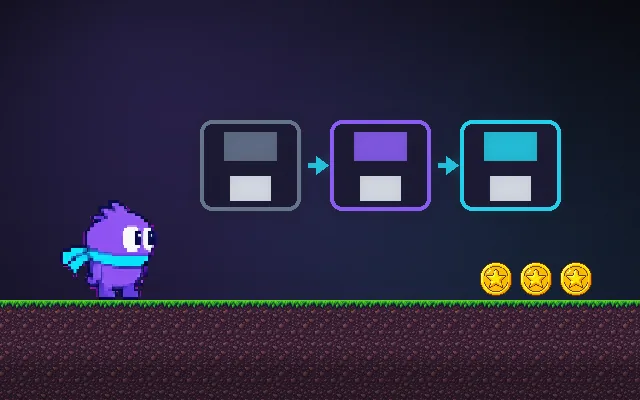
Saving means turning the game state into data (usually JSON) and writing it somewhere. Loading means reading it back. The part that bites later is updates: rename a field or add a new one and old saves load as garbage or crash. Putting a version number in every save and upgrading old ones fixes that.
Try this: Grab some coins, Save, then Ship update v2 and Load. With versioning off, your coins are lost. Turn versioning on and repeat.
Collect coins, then save. The save is stored in this browser only.
Prompt bit
Works for 2D or 3D in any engine (Unity, Unreal, Godot, web). Paste the short one for a quick fix, or the detailed one when you want it done properly.
Add versioned saves: serialize only game data to JSON with a version number, write to a temp file then rename, autosave at most every 30 s, and run migration functions on load so saves from older versions upgrade instead of crashing or losing progress.
Build a save system (2D or 3D, any engine). Keep save data separate from scene objects: a plain SaveData object with only what is needed (player position, health, inventory item ids, flags, settings), never engine references. Serialize it to JSON with a top-level version number (start at 1). Write safely: write to save.tmp, then rename over save.json (or keep the previous save as a backup), so a crash mid-write cannot corrupt it. On the web use localStorage or IndexedDB; on desktop the platform's persistent data path; on consoles their save APIs. On load, read the version and run migrations in order (v1 to v2: rename coins to gold, add missing fields with defaults) before applying it; if parsing fails, fall back to the backup and tell the player. Autosave on checkpoints and at most every 30 s, never during a fall or a cutscene. Support several slots, show slot time and playtime, and add a debug button to export and import saves.
Where it's used
- RPGs and adventures: slots, checkpoints, autosave
- Roguelikes: meta-progression saved between runs
- Mobile and idle games: instant save on background
- Web games: localStorage saves
- Settings: volume, controls and accessibility options
Common mistakes
No version number (every update risks breaking saves), saving engine objects instead of plain data, writing directly over the only save file, and autosaving at dangerous moments such as mid-fall.
Writing this with an AI assistant? See our best AI coding assistants for game developers.
Missing a concept? Request one.